

Security & privacy at the core
Telegram is built to keep your messages private. From strong encryption to fine-grained privacy controls, here is how your data stays safe.
Protected by MTProto
Every Telegram connection is secured with MTProto, a protocol designed for speed and reliability without compromising safety. Cloud chats are encrypted between your device and Telegram's distributed data centres, so your conversations are never exposed in transit.
- Encrypted in transit and at rest
- Distributed, resilient infrastructure
- No single point of failure

Login codes and two-step verification
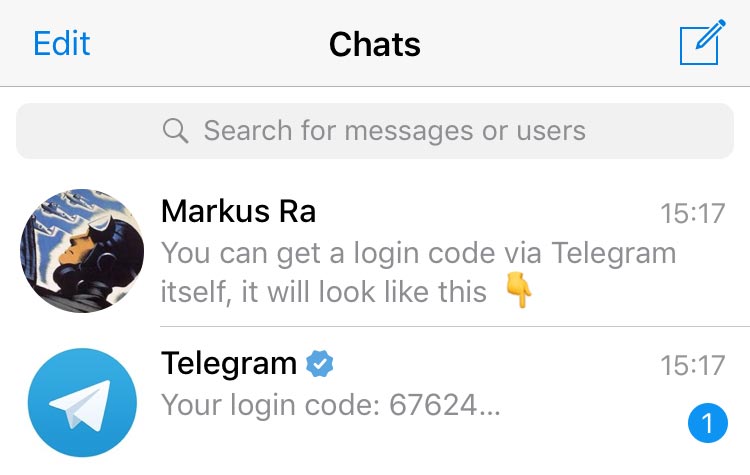
Telegram sends one-time login codes through the app itself, and you can add a two-step verification password so nobody can access your account with just an SMS code. Active sessions are always visible, and you can end any of them instantly.
- One-time login codes
- Optional 2FA password
- Manage active sessions
Privacy controls in your hands
Telegram gives you the tools to decide exactly how much you share and with whom.
Secret Chats
Device-to-device end-to-end encryption with no cloud backup, so only you and the recipient can read the messages.
Self-destruct timers
Set messages, photos and videos to disappear automatically after a chosen time in Secret Chats.
Privacy settings
Control who can see your phone number, last seen, profile photo and who can add you to groups.
Passcode & biometrics
Lock the app with a passcode, Face ID or fingerprint so your chats stay private even if your device is unlocked.
No ads, no tracking
Telegram does not sell your data or show ads in your private chats - your information is not the product.
Delete anywhere
Remove any message for everyone in a chat at any time, with no time limit, on both sides of the conversation.
Four quick tips to stay secure
- 1
Turn on two-step verification to protect your account with a password.
- 2
Use Secret Chats for your most sensitive conversations.
- 3
Regularly review and terminate active sessions you no longer use.
- 4
Set a local passcode and enable biometric unlock on your devices.